
Image to Video AI Generator

Upload an image, describe how it should move, and turn it into a short AI video with the model that best fits your quality, speed, audio, and control needs.

Upload a source image(0/1)
0/2000
Advanced settings
Estimated cost75 credits

Prompts are safety-screened. NSFW, explicit, sexually suggestive, deepfake, and harmful content is prohibited. View acceptable use policy

Neon rain walk

A hooded traveler walks slowly toward the camera beneath a black umbrella on a rainy cyberpunk street; neon signs reflect across the wet pavement, steady tracking shot, cinematic atmosphere.
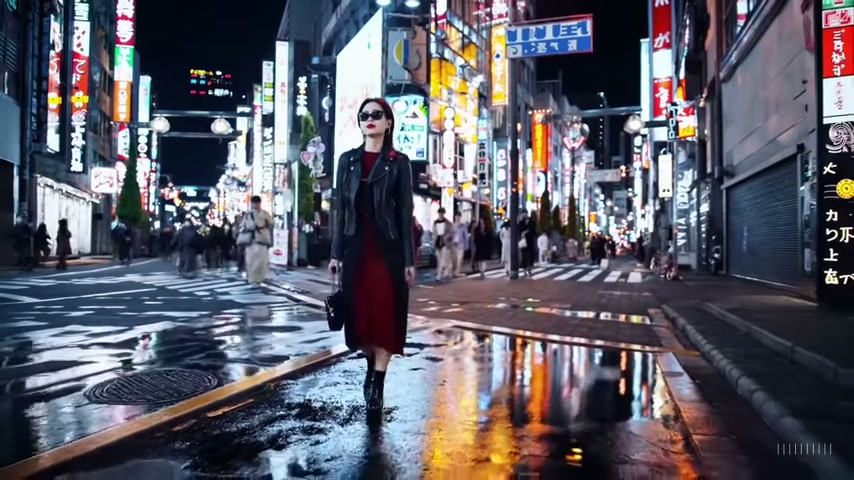
Tokyo night walk

Tokyo night walk

A stylish woman in a black leather jacket and long red dress walks confidently down a Tokyo street at night; warm neon signs glow around her and reflect across the wet pavement, smooth cinematic tracking shot.
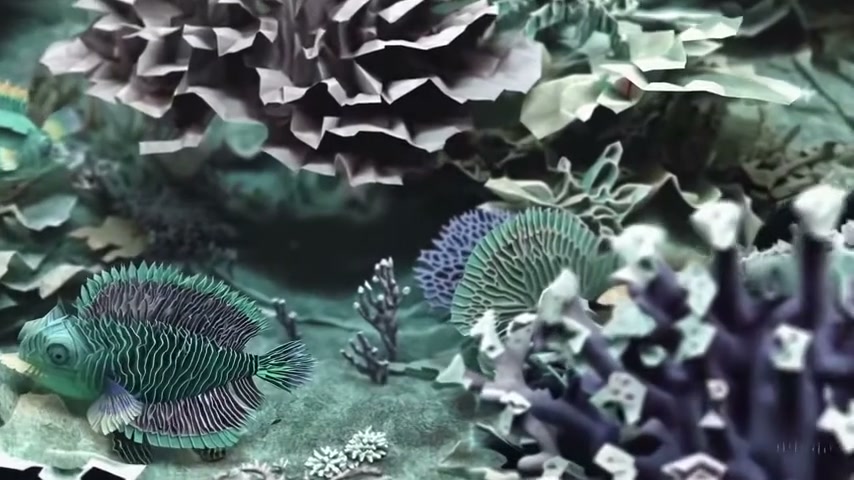
Origami undersea world

Origami undersea world

An underwater coral reef made entirely from folded paper comes alive as origami fish swim between layered plants; gentle forward camera movement, soft aquatic light, consistent handcrafted paper texture.

Compare AI Image-to-Video Models

Choose the best model for your image, motion, quality, audio, and budget needs. Every model below is available in the generator above.

ModelBest forDuration and resolutionAudioEnd frame
Hailuo 2.3 Fast
MiniMax
Fast generation
Quick clips from photos of people, products, and everyday scenes.
6 / 10 sec
Model default
NoNo
Veo 3.1 Lite
Google
Cinematic realism
Natural motion and realistic lighting for cinematic scenes and hero visuals.
4 / 6 / 8 sec
720p / 1080p
NoNo
Kling 3 Standard
Kling
Versatile high quality
Smooth action and stable camera motion for people, ads, and cinematic clips.
3–15 sec
Model default
YesYes
Wan 2.7
Alibaba
Precise control
Guide transitions and product motion with start and end frames.
2–15 sec
720p / 1080p
NoYes
Seedance 2.0 Mini
ByteDance
Fast video with audio
Native audio and flexible formats for fast social video creation.
4–15 sec
480p / 720p / 1080p / 4k
YesYes
Seedance 2.5
ByteDance
Polished cinematic stories
Longer, coherent clips for cinematic ads and visual storytelling.
4–30 sec
480p / 720p / 1080p / 4k
YesYes
Grok Imagine 1.5
xAI
Social creativity
Expressive characters, memes, and playful social content.
1–15 sec
480p / 720p
NoNo
MiniMax H3
MiniMax
Picture and sound together
Generate visuals, dialogue, and ambient sound together for audiovisual stories.
3–15 sec
480p / 768p
YesYes
Vidu Q3
Vidu
Anime and characters
Anime-style motion, character expressions, camera moves, audio, and background music.
1–16 sec
540p / 720p / 1080p
YesNo

How to Turn an Image into a Video with AI

The workflow keeps the creative decisions focused: provide the starting frame, describe the movement, then review the generated clip.

1. Upload one image

Start with a clear portrait, product photo, illustration, landscape, or concept frame. The source image establishes the subject, composition, color, and opening frame.

2. Describe the motion

Explain what the subject should do, how the camera should move, and which environmental details should change. Keep the directions compatible with one short shot.

3. Generate and review

The connected video model will turn the still frame into a clip. Review motion quality, subject consistency, framing, and unwanted distortions before downloading or trying another prompt.

Image to Video AI Examples

Watch three short AI-generated clips, then use their prompt patterns to describe movement, camera direction, atmosphere, and visual style in your own image.

Hailuo AI example
Neon rain walk

A short Hailuo AI scene combining forward subject movement, falling rain, reflective pavement, and vivid cyberpunk lighting.

Prompt pattern

A hooded traveler walks slowly toward the camera beneath a black umbrella on a rainy cyberpunk street; neon signs reflect across the wet pavement, steady tracking shot, cinematic atmosphere.

Sora example
Tokyo night walk

A polished Sora scene with confident character motion, a moving street crowd, crisp fashion details, and colorful reflections.

Prompt pattern

A stylish woman in a black leather jacket and long red dress walks confidently down a Tokyo street at night; warm neon signs glow around her and reflect across the wet pavement, smooth cinematic tracking shot.

Sora example
Origami undersea world

A playful Sora example showing how a consistent material style can carry across moving animals, plants, and camera depth.

Prompt pattern

An underwater coral reef made entirely from folded paper comes alive as origami fish swim between layered plants; gentle forward camera movement, soft aquatic light, consistent handcrafted paper texture.

Turn Photos into AI Videos for Different Creative Projects

Image-to-video generation can add controlled motion to an existing visual without rebuilding the subject and composition from scratch.

Product motion clips

Animate a product hero shot with a slow camera orbit, shifting reflections, moving fabric, steam, particles, or a controlled background reveal.

Portrait animation

Add subtle expression, breathing, hair movement, or a gentle camera push while asking the model to preserve the face, clothing, and lighting.

Short social content

Turn campaign images, artwork, or still posts into short motion assets for social feeds, ads, teasers, and visual transitions.

Cinematic concept shots

Explore camera motion, weather, lighting changes, environmental movement, and atmosphere from a prepared storyboard or concept frame.

Write a Better Image-to-Video Motion Prompt

A useful motion prompt describes visible change over time. It should guide movement without replacing the subject or contradicting the source image.

Subject movement

State one main action such as turning, walking, blinking, lifting an object, or moving through the frame. Subtle movement is usually easier to keep consistent.

Camera direction

Choose a slow push-in, pull-back, pan, tilt, orbit, or locked camera. Avoid combining several camera moves in one short clip.

Scene behavior

Mention secondary motion such as wind, rain, smoke, water, cloth, traffic, or changing light only when it supports the main action.

Visual continuity

Ask the model to preserve facial features, product shape, clothing, logos, color palette, and composition when those details must remain recognizable.

Example of a complete motion prompt

The woman turns slightly toward the camera and blinks once while a light breeze moves a few strands of hair. The camera makes one slow push-in. Keep her facial features, clothing, background composition, and warm evening light unchanged.

This prompt assigns one clear subject action, one camera move, one small environmental motion, and an explicit list of details that should remain consistent.

Image to Video AI Generator FAQ

Answers about image-to-video generation, source images, motion prompts, audio, and the current availability of the workspace.

Turn Your Image Into a Video

Upload a clear starting image, choose the model that fits the job, and describe the motion you want to see.

Generate a Video